Showing posts with label Timer. Show all posts

Unity3D How To Create A Simple Countdown Timer

Unity3D How To Create A Simple Countdown Timer

I needed a simple countdown timer to create a splash screen effect so I could jump to the next scene. In this example, I create a time governor that loops and keeps checking to see if the time has expired ( <= 0 ) then executes the actions.

Set Total Countdown Time

In your class create a float variable that will be the total amount of time to countdown and the reset time holder:
public class CountDownTimer : Monobehaviour {

float timeRemaining; // the timer
float timeRemainingReset; // the timer reset

Add To A Main Update Loop

Add this code to any of your main update loops (Update, FixedUpdate, LateUpdate):
void Update() {
     timeRemaining -= Time.deltaTime; // subtract time each frame

     if( timeRemaining <= 0 ) {
          // reset the timer
          timeRemaining = timeRemainingReset;
          // perform your actions (load next scene, move a gameobject, perform garbage clean up etc.)
          HealPlayer();
          CheckCombat();
     }
}

Unity3D How To Create A Simple Countdown Timer

How to Create Simple Timer

Unity How to Create Simple Timer C#


A visible or background timer runs on most games. We will create an easy one which ticks seconds. In this tutorial we don’t use any value such as integer, float etc. We just need a GUI text. Let’s create.

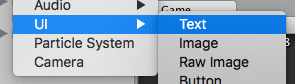
Open your project and create a GUIText. Right-Click on hierarchy window, UI/Text.

Unity How to Create Simple Timer C#

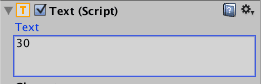
Edit its text. This step is important because we will use this text. Set it as your timer beginning value.

Unity How to Create Simple Timer C#

Now create a C# script. In this script, we are going to take the value of GUIText and decrease it by 1 every second. Don’t forget to implement using UnityEngine.UI; lib because Text needs it.

public class Timer : MonoBehaviour {
 
	public Text scoreText;
 
	void Start () {
		InvokeRepeating("RunTimer", 1, 1);
	}
 
	void RunTimer() {
		scoreText.text = (int.Parse(scoreText.text) - 1).ToString();
	}
}

That’s it. Set your UI text as scoreText and run it. We got a “seconds” timer with a simple logic.