Just starting out with Unity shader programming.
Made this low poly shader:
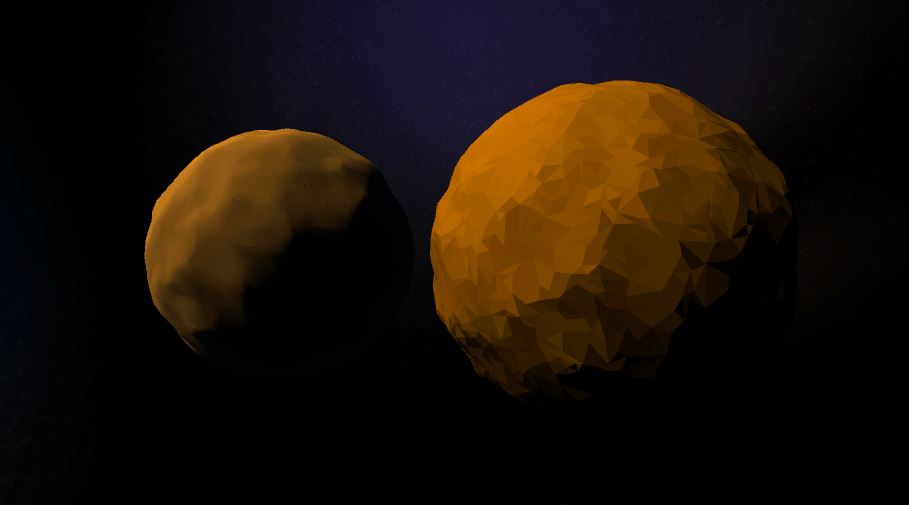
Code:
Shader "Custom/LowPoly2"
{
 Properties
 {
  _BaseColor ("BaseColor", Color) = (1,1,1,1)
 }
 SubShader
 {
  Tags { "RenderType"="Opaque" "LightMode"="ForwardBase" }
  LOD 100

  Pass
  {
   CGPROGRAM
   #pragma vertex vert
   #pragma geometry geom
   #pragma fragment frag

   #include "UnityCG.cginc"
   #include "UnityLightingCommon.cginc"

   struct appdata
   {
    float4 pos : POSITION;
    float3 norm : NORMAL;
   };

   struct v2g
   {
    float4 pos : SV_POSITION;
    float3 norm : TEXCOORD0;
   };

   struct g2f {
    float4 pos : SV_POSITION;
    fixed4 diffColor : COLOR0;
   };

   v2g vert (appdata v)
   {
    v2g o;
    o.pos = v.pos;
    o.norm = v.norm;
    return o;
   }

   [maxvertexcount(3)]
   void geom(triangle v2g i[3], inout TriangleStream triStream)
   {
    float3 commonNorm = i[0].norm;
    float4 worldPos = mul(unity_ObjectToWorld, i[0].pos);

    half3 worldNormal = normalize(mul((float3x3)unity_ObjectToWorld, commonNorm));
    half nl = max(0, dot(worldNormal, _WorldSpaceLightPos0.xyz));
    fixed4 diff = nl * _LightColor0;

    g2f o;
    o.pos = mul(UNITY_MATRIX_MVP, i[0].pos);
    o.diffColor = diff;
    triStream.Append(o);

    o.pos = mul(UNITY_MATRIX_MVP, i[1].pos);
    o.diffColor = diff;
    triStream.Append(o);

    o.pos = mul(UNITY_MATRIX_MVP, i[2].pos);
    o.diffColor = diff;
    triStream.Append(o);
   }

   uniform float4 _BaseColor;
   fixed4 frag (g2f i) : SV_Target
   {
    fixed4 mainColor = _BaseColor * i.diffColor;
    return mainColor;
   }
   ENDCG
  }
 }
}
